Content strategy
What's in a content audit, and do you need one?
You've been posting for a while. There's a blog, a few landing pages, an old launch page nobody's touched since 2023, and a FAQ that still mentions a product you've dropped. You keep adding new pieces, but you're not sure what the old ones are doing for you. That's the point where a content audit helps. So what is a content audit? It's a careful look at everything you've already published, so you can decide what to keep, fix, merge or remove before you write more.
What is a content audit?
A content audit is a review of the content on your website (and sometimes your social channels, emails and sales material too). You list what you have, check how each piece is doing, and decide what to do with it.
It's a bit like clearing out a wardrobe before buying new clothes. You find the things you love, the things that need mending, the doubles and the things that don't fit any more.
Content inventory vs content audit
These two get mixed up a lot. A content inventory is the list: every page, its address, title and date. The audit is the judgement you make about each item on that list. You need the inventory first, then the audit tells you what to do.
What we look at in a content audit
Every audit is a little different, but these are the questions we ask about each page or post.
What you've published
We list every page and post: the URL, title, type (blog, landing page, help article), the date it went up and when it was last updated.
What gets read
Next, we check how each piece is doing. Which pages get visits? How do people find them? Do they stay and read, or leave straight away? Do any lead to an enquiry or a sale? We use your own analytics and search data for this, so the picture comes from your site and not a guess.
What's out of date or wrong
Old prices, products you've stopped selling, team members who've left, broken links, screenshots of an old design. These knock trust when a customer spots them.
Whether it sounds like you
We read for voice and clarity. Do your pages sound like one brand, or like five different writers? Is the copy plain enough for a busy customer? We wrote about why this happens in why your brand sounds different on every channel.
Gaps
What are customers asking that you haven't answered anywhere? Sales calls, support emails and search queries are good places to look. A gap is a ready made idea for a new piece.
SEO basics
With our partner SEO specialists, we check titles, meta descriptions, headings, internal links and whether two pages are competing for the same search. Google's own advice on helpful, people first content is a useful yardstick here.
What you get at the end
The useful part of an audit is the decision for each page. Each one gets a label:
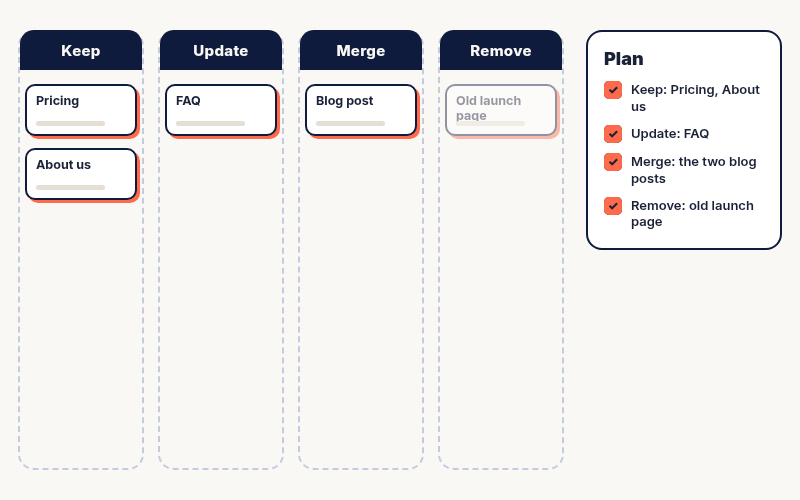
- Keep: accurate, useful and getting read. Leave it, maybe add a link to it from newer posts.
- Update: a good topic that's gone stale or isn't quite hitting the mark. Refresh it.
- Merge: two or three pages saying the same thing. Combine them into one stronger page and redirect the old addresses.
- Remove: no visits, no purpose and nothing worth saving. Take it down, or redirect it if anyone still links to it.
On top of that, you get a short list of new pieces to write to fill the gaps, in the order we'd tackle them. The aim is a plan you can act on, not a spreadsheet that sits in a folder.
Here's what a single row of that plan can look like:
Before the audit
/blog/our-pricing-2023/ "Delivering best in class value through holistic, end to end solutions." Few visits. Old prices.
After the audit
Update: rewrite in plain words, add this year's prices, link it from the services page and redirect the old pricing FAQ here.
(That row is a made up example, to show the format.)
How a content audit goes, step by step
1. Agree the goal. More enquiries, better search visibility, a cleaner site before a redesign? The goal decides which pages get the most attention. 2. Set the scope. The whole site, or just the blog? Small sites can do everything. Bigger ones can start with the pages that get the most visits. 3. Build the inventory. List every page with its basic details. 4. Add the numbers and notes. Visits, search data and a quick read for accuracy and voice. 5. Decide. Keep, update, merge or remove for each page. 6. Plan the fixes. Put the changes in order and agree who does what.
The US government's 18F team has a short, clear guide to running a content audit if you'd like to try it yourself.
Do you need one?
A content audit is worth doing if any of these sound familiar:
- You've been publishing for a year or more and haven't looked back.
- You're planning a redesign or a move to a new website platform.
- Your product, prices or positioning have changed.
- Search visits have dropped and you're not sure why.
If you're brand new with a handful of pages, you probably don't need one yet. Just keep a simple list of what you publish.
An audit is also a sensible first step before a monthly content plan, because it shows where effort will pay off. Our post on what a monthly content retainer gets you explains how that ongoing support looks.
Content audit FAQ
What does a content audit look like?
Usually a spreadsheet with one row per page: its address, title, date, how it's doing, notes on quality and a decision.
What is the purpose of a content audit?
To find out what your published content is doing for you, then fix, merge or remove what isn't helping and spot the gaps worth filling.
How do you do a content audit?
Agree a goal, list every page, add visit and search data, read each one for accuracy and voice, then give each page a decision and plan the changes.
What's the difference between a content inventory and a content audit?
The inventory is the list of what you have. The audit is the review of that list and the decision you make about each piece.
How often should you do a content audit?
There's no fixed rule. Many teams do a full one every year or so, or before a redesign, with lighter check ins on key pages in between.
Want a second pair of eyes on your content?
We run content audits for startups and growing brands, with SEO basics covered by our partner specialists, and hand back a clear, plain plan. Have a look at our services, or email hello@markivasolutions.com with a link to your site and we'll tell you what an audit would look like for you.